
Everest by iqlab
Operations · Module 06

Staff Manager

Coordinate employee records, roles, schedules, breaks and gaming-floor shift information.

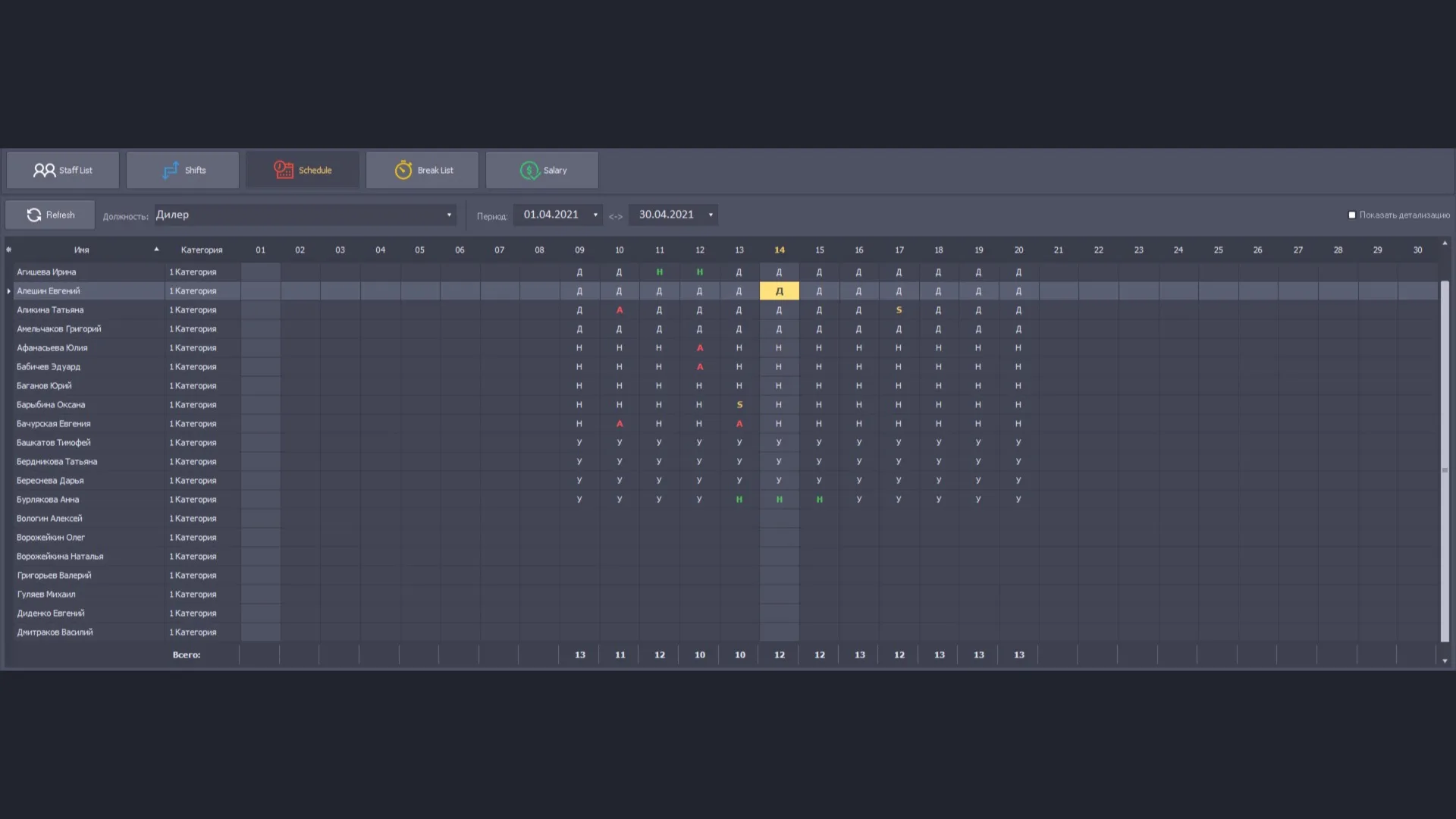
Staff Manager interface example from Everest materials
Everest interface example · system materials
Overview

What this module does

Staff Manager brings together personnel records and scheduling tools for gaming-floor teams. It includes the employee list, schedule, break list and staff shift list, with a separate screen for displaying upcoming shifts.

The materials name four components: Staff List, Schedule, Break List and Staff Shift List. Together they cover basic employee information, work details, shift planning, employee schedules, break lists and a shift list for table staff. The CMS description also includes a payroll-calculation section. Everest Black says the staff-management module assigns roles and access rights to system functions; detailed payroll formulas are not specified in the PDFs.

Key functions
  • Staff List with employee search and records
  • Schedule and gaming-floor shift planning
  • Break List and Staff Shift List
  • Role and system-access assignment
  • Payroll-calculation section
Inside this module

Staff Manager components

Staff List

Maintain employee records, work information, schedules, shifts, breaks and payroll details. The materials name four components: Staff List, Schedule, Break List and Staff Shift List. Together they cover basic employee information, work details, shift planning, employee schedules, break lists and a shift list for table staff. The CMS description also includes a payroll-calculation section. Everest Black says the staff-management module assigns roles and access rights to system functions; detailed payroll formulas are not specified in the PDFs.

Read the detailed description

Schedule

Plan employee working times and maintain the staff schedule.

Break List

Organize and review staff break information.

Staff Shift List

Prepare shift information for gaming-floor personnel and table staff.

Staff Screen

Display upcoming gaming-staff shifts on large screens in staff break areas. Its displayed schedule data comes from Staff List, with which the screen has an internal integration. The module presents the schedule information for viewing; personnel and shift records are maintained in Staff List.

Read the detailed description

Personal Mail

Send and receive messages between members of staff without leaving the Everest workspace. The system materials show folders for incoming, sent and deleted messages, a message list with subject, time of creation, sender and recipient, a panel holding the message text and a panel listing attached files. Messages can be written, deleted, flagged and filtered by date.

Read the detailed description
Screens & operations

Screens in the staff module

Records

  • Staff list with search and filtering
  • Personal file with employment details
  • Access roles and rights

Time and shifts

  • Shift settings
  • Schedule settings
  • Break list
  • Shift list for gaming staff at the tables

Payroll and display

  • Salary calculation list
  • Shift list monitor for staff-room screens

Named from the Everest system materials. The screens and operations present in a given casino depend on the installed modules, assigned roles and local operating procedures.

Connected workflow

How it fits into Everest

Staff List maintains the shift information used by Staff Screen. Staff records and role settings are separate controls: a user’s access to Everest functions is governed by the system’s configured roles and permissions.