
Everest by iqlab
Guest services · Module 01

Reception

Identify visitors, record casino visits and maintain guest records and club cards.

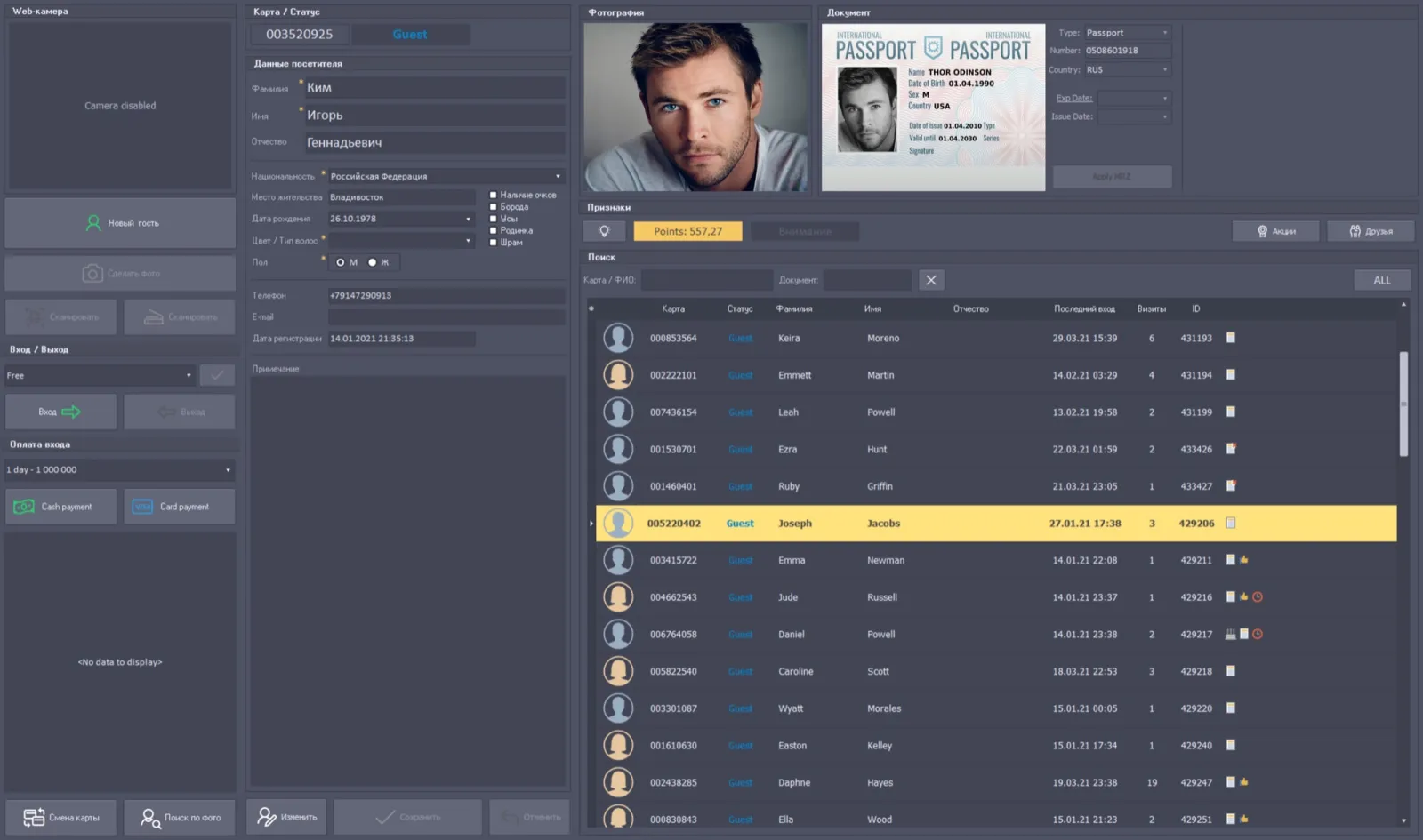
Reception interface example from Everest materials
Everest interface example · system materials
Overview

What this module does

Reception is the starting point for a guest record. Staff can capture personal information, a photograph and copies of identity documents, then record when a visitor enters or leaves the property.

MRZ recognition can read supported machine-readable travel documents and fill the first name, last name, date of birth, nationality and gender fields. Reception also supports issuing or replacing a club card and recording an entry fee when the casino’s rules require one. The searchable guest database supports review and reporting of visits.

Key functions
  • Personal details, photographs and document copies
  • MRZ-assisted entry of supported identity fields
  • Visit, entry and exit history
  • Club-card issue and replacement
  • Entry-fee recording and guest database reports
Inside this module

Guest record tools

Player Details

Review a visitor’s personal record, statuses, visits, notes and detailed gaming history. The CMS description includes personal details, game-exclusion information, staff notes and comments, a friends list, issued-card information, statuses and visit history. It also describes a detailed gaming history for each visit, including sessions and the guest’s bonus account with a history of points credited and spent.

Read the detailed description

Photo View

Find a visitor visually using a photograph and attribute filters, then open their guest record. When the correct visitor is identified, the module links to Player Details for the underlying personal record and visit information. It complements reception’s stored guest photographs and is intended to support identification workflows.

Read the detailed description

Club-card registration

Issue or replace a visitor card and connect it to the guest record used by cashier and player-service workflows.

Screens & operations

What the module records

Tabs

  • Registration
  • Friends
  • Promotions

Guest profile

  • Any number of photographs and documents
  • Enlarged view and image editing
  • Photograph or document uploaded from a file
  • Main photograph
  • Document display priority
  • Required fields marked with an asterisk
  • Additional indicators in a separate window

Registering a guest

  • New guest, then the card is scanned
  • Personal data, nationality, gender and residence
  • Photograph taken from the web camera
  • Document scanned
  • Document type, number, issuing country, validity and issue date
  • Reception note
  • Registration date set automatically

Reading a document

  • MRZ zone read from a clean, well-resolved scan
  • Apply MRZ highlighted when recognition succeeds
  • Name and surname
  • Document number and issuing country
  • Nationality
  • Date of birth

Cards and visits

  • Card changed against a newly scanned card
  • Status assigned from the card type
  • Entry and exit marked at reception
  • Marking automatic where turnstiles are installed
  • In-hall marker shown on the photograph
  • Entrance fee per entry or by subscription

Lists and search

  • Search by card number and name
  • Filter between all guests and those currently in the casino
  • Status shown by colour
  • Friends added and removed by double-click

Named from the Everest system materials. The screens and operations present in a given casino depend on the installed modules, assigned roles and local operating procedures.

Connected workflow

How it fits into Everest

The guest profile and club card can then be used by connected cashier, player-tracking and promotion workflows. Security checks can warn staff about similar records, an expiring entry subscription or a configured visitor status.