
Table Tracking
Calculate hourly and daily table results from opening float, checks, fills, credits and dropbox totals.
What this module does
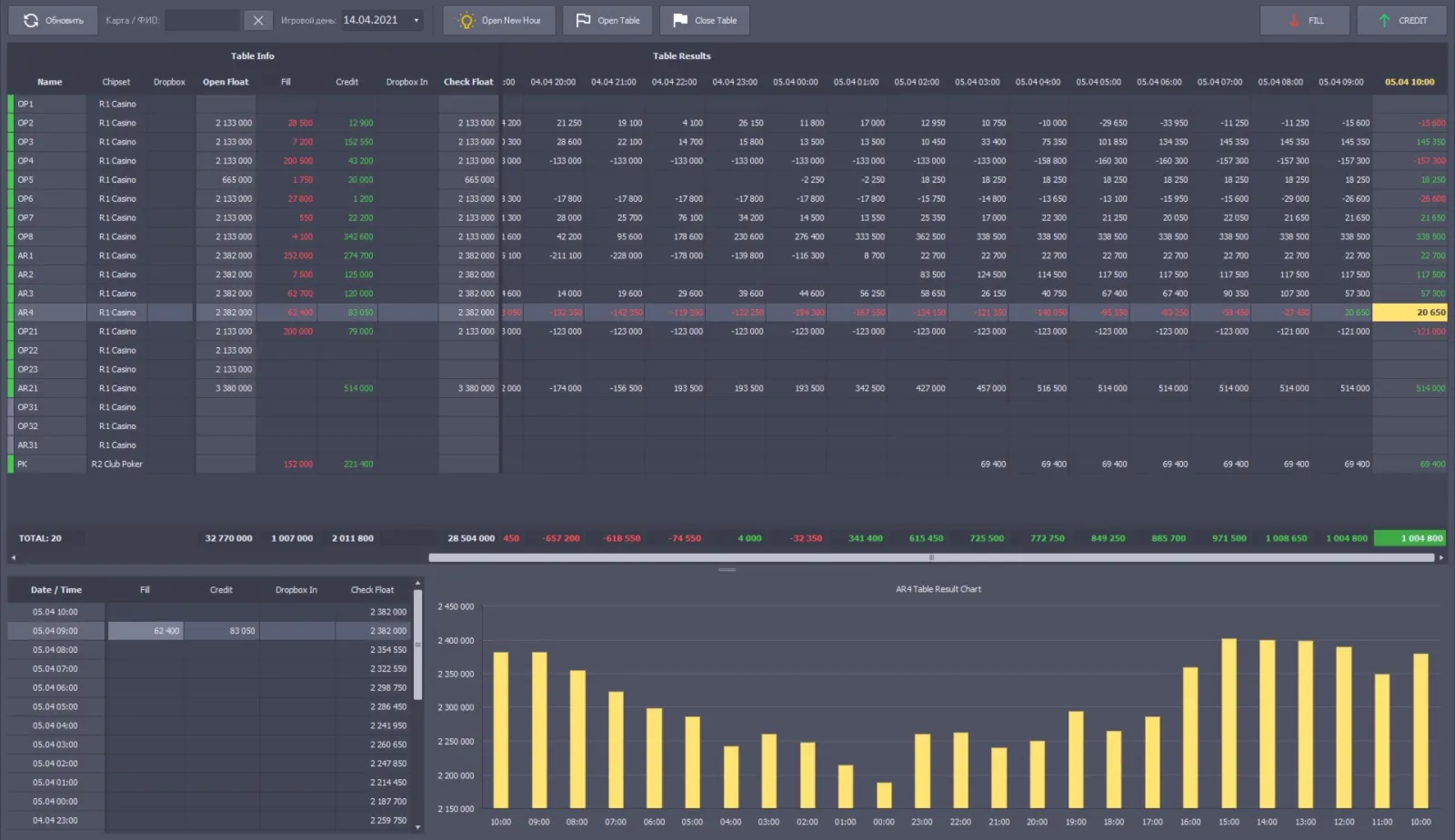
Table Tracking consolidates table operations entered in the Inspector module and presents results by hour and for the gaming day. Results can be reviewed by currency, hall, pit and game.
For an hourly current count, the source gives: Current Check Float − Open Float − Current Total Fills + Current Total Credits + Current Total Dropbox. For the final count it gives: Last Check Float − Open Float − Total Fills + Total Credits + Total Dropbox. The opening float is passed from Inspector after the first opening of the day. A table may be opened and temporarily closed several times in one day; Opener / Closer values are not used in the current-count formula. To keep an hourly result reliable, the current check float should be entered no later than five minutes after the next hour begins. The table currency is configured in Cash Desk and may be changed before the table’s first opening of the gaming day.
- Hourly current count and gaming-day total result
- Opening float transferred from Inspector
- Confirmed fills, credits and dropbox totals
- Breakdown by currency, hall, pit and game
- Timely hourly check-float entry for reliable results
How it fits into Everest
The Inspector supplies opening float, check float, fills, credits and dropbox information. Table Tracking applies the count formulas to these entries; the final table result is based on the last check of the gaming day.